How HDD Architecture Creates Physical Limits on Storage and Throughput
What happens inside a hard drive and why it's slow
Technology keeps moving faster. Every year CPUs become more powerful, networks get faster, and AI keeps pushing what we think is possible.
But storage is different. It has stayed stubbornly limited.
When I say storage, I mean the disks that hold our data. And we mainly have two types: HDD and SSD.
Both have limits. But here I’ll mainly focus on HDDs (Hard Disk Drives).
Not just limits on how much data they can hold (capacity), but on how fast they can move that data (throughput and IOPS).
And these aren’t soft limits you can fix by throwing money at. They’re real, physical walls.
Look at AWS. Their EBS HDD volumes have a service limit of 16 TB storage with a max throughput of 500 MiB/s. SSDs go higher, up to 64 TB and 4,000 MiB/s, but even those have a ceiling.
Why can’t they just make it faster and bigger?
That’s what this article is about.
How an HDD works from a beginner’s POV
Inside every HDD, there is a motor attached to a spindle that spins magnetic platters. The platters are stacked on top of each other, like a stack of CDs. Each platter has two surfaces (top and bottom), and each surface has its own head.
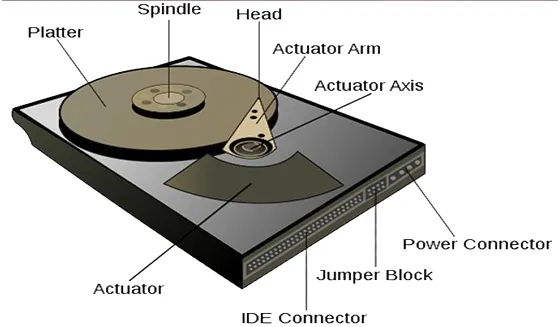
Think of it like a record player. The arm swings across the platter, and the head at the tip reads the data. But unlike a record player, the head doesn’t touch the platter. It floats just nanometers above the surface.
Two things move inside an HDD to read/write data:
- The arm swings left and right (inner edge to outer edge of the platter).
- The platter spins in a circle underneath the head.
Together, these two movements let the head reach any spot on the platter to read or write data.
How a Read/Write Actually Happens
The platter surface is organized into thousands of concentric circles called tracks. Each track is divided into smaller chunks called sectors. A sector is the smallest unit of data the drive can read or write.
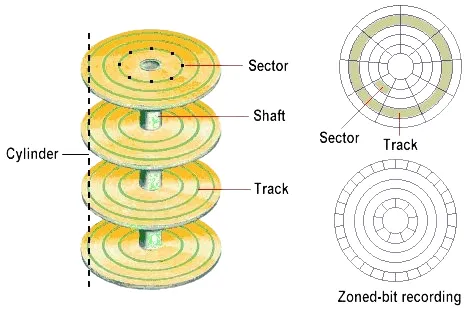
When the drive needs to read/write data, it goes through these steps:
Step 1 — Seek. The actuator swings the arm to position the head over the correct track. This movement is called seek time. On a typical consumer drive, this takes about 5 to 10 milliseconds.
Step 2 — Wait for rotation. The head is now on the right track, but the exact sector it needs might not be under the head yet. The platter is spinning, so the head waits for the right sector to rotate underneath it. This wait is called rotational latency.
An average disk spins at 7,200 RPM (revolutions per minute). One full rotation takes about 8.3 ms. On average, the head waits for half a rotation (~4.15 ms) for the right sector to come under it.
Step 3 — What if it misses? If the head arrives just slightly too late and the sector has already passed, it has to wait for the platter to come all the way back around. That's a full rotation, another 8.3ms wasted. This is called a rotational miss.
Step 4 — Transfer. Once the sector is under the head, the actual read or write happens. The platter is magnetically coated. For a read, the head detects the direction of the magnetic field of each bit. For a write, it changes the direction to store new 0s and 1s.
The platter keeps spinning as this happens, and the time it takes to transfer the data is called transfer time.
Each sector is typically 4KB, which is the smallest unit the disk reads/writes at a time. If the next sectors are sequential, the head doesn’t need to move, it just keeps going.
But if the next sectors are on different tracks (because of fragmentation), the arm has to reposition, which adds more seek time. Tools like disk defragmenters try to fix this by placing related data closer together so reads become sequential again.
How Fast Can an HDD Actually Go (IOPS and Throughput)
There are two ways data gets accessed on a disk: random and sequential.
Let’s calculate both.
Random
Before the head can read or write anything, it has to get to the right spot:
- Seek time (~5-10ms) + rotational latency (~4.15ms) = ~9 to 14ms just to get into position.
Each sector is 4KB, and the actual read/write takes microseconds. So almost all the time is spent on physical movement, not data transfer. This is called mechanical overhead.
Now the math: if each random operation takes about 9 to 14 ms, you can fit roughly 70 to 110 operations per second. That number is called IOPS (Input/Output Operations Per Second).
Throughput = IOPS × Block Size
Random throughput: 70-110 IOPS × 4KB = 280KB/s to 440KB/s. That's less than half a MB per second.
Sequential
Here, the head only needs to seek once. After that, data is in consecutive sectors, so the head just keeps reading or writing as the platter spins.
Sequential throughput depends on rotational speed and how densely data is packed on the tracks. A typical 7,200 RPM consumer HDD does around 100–200 MB/s sequential.
That’s the gap: ~0.4 MB/s random vs ~150 MB/s sequential. Same disk, same hardware. The difference is purely mechanical overhead.
Why HDD Can't Get Faster or Bigger
Looking at the architecture, HDDs are slow because of physical movement. The obvious question is: why not just make things move faster?
Because physics says NO.
Speed
The arm movement (seek time) has a ceiling. Move it faster and you get more vibration, more heat, and less accuracy when reading data.
Rotational speed has a ceiling too. The fastest enterprise drives go up to 15,000 RPM, and even that comes with serious trade-offs: more heat, more vibration, and more wear. At some point, pushing speed just makes the drive unreliable.
Then there's latency. In desktops, HDDs connect through SATA which is a direct cable to the motherboard. In the cloud, there's an actual network between compute and storage, which adds extra latency on top of the mechanical overhead.
Storage
This is where engineers are still making progress, but slowly. The largest HDD today is around 36TB.
Data is stored on platters, and a typical drive can have around 5 of them. Adding more platters means more weight, more heat, and more vibration. Physics gets in the way again.
The other approach is packing bits closer together so they take up less space. This increases capacity, but only up to a point. If bits are packed too tightly, their magnetic fields start interfering with each other. This can flip neighboring bits and corrupt data. This limit is known as the superparamagnetic limit.
How Big Systems Work Around These Limits
Even with all these physical limits, massive systems (AI workloads, streaming platforms, large databases) still rely on HDDs. So how do they make it work?
A single disk is slow. There’s no way around that.
Instead of trying to make one disk faster, they use many disks together. This is called distributed storage.
For example, AWS offers EBS HDD volumes with throughput of up to 500 MiB/s, which is far beyond what a single disk can deliver. When you create a 100 GB EBS volume, your data isn’t stored on just one disk. Behind the scenes, AWS spreads it across multiple drives, allowing them to achieve throughput that no single HDD could reach on its own.
That’s how these systems push throughput far beyond the limits of a single HDD.
In the end, they’re not breaking the physical limits. They’re working around them by scaling out.
Thanks for reading,
-Alon