EP12: Learning System Design | URL Shortener | Part 4 API Design
Designing APIs, understanding HTTP, and building the redirect flow
Howdy ppl,
It’s been a month since I last wrote anything. I got busy and couldn’t really manage the time to write. But now I’m back.
In the last post, I talked about how I designed the database using NoSQL for the URL shortener.
Now it’s time for part 4, designing the API.
I’m not from a core development background, but I do have a basic foundation in programming. And honestly, for now, that’s enough. My goal here isn’t to build the most perfect solution, but to think in the right direction.
So if I had to design an API, how would I approach it?
Before jumping into the design, I want to quickly explain what an API is, in the way I understand it.
That’s the simple idea. Now let’s dive deeper into the design part.
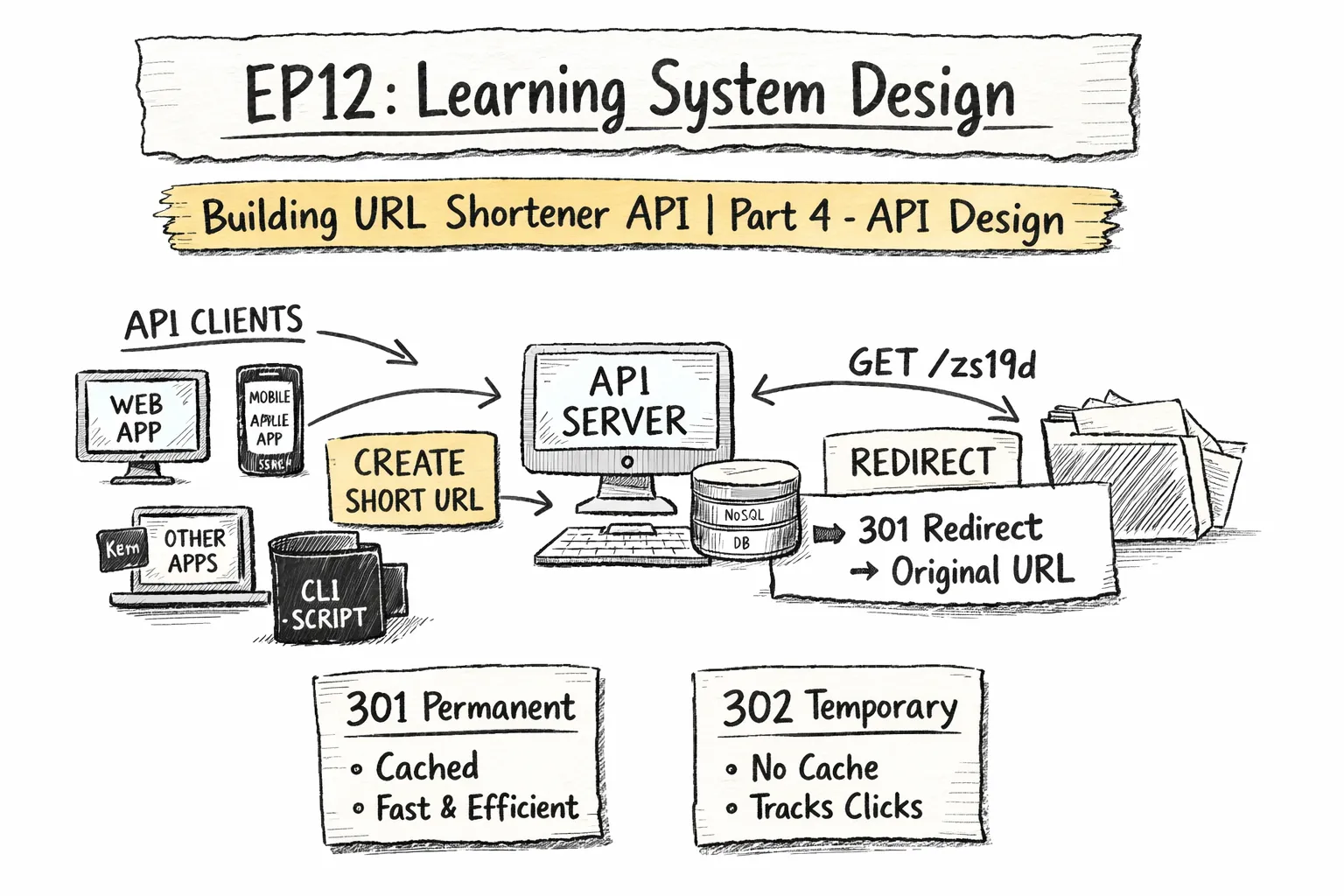
The first thing I would think about is who my clients are. A client is anyone or anything that calls the API. It’s not just a person using a browser.
For a URL shortener, possible clients could be:
-
A browser running a frontend app
-
A mobile app
-
The application itself, where one service talks to another
-
A CLI tool or script someone wrote..
Basically, we are building an API that should not care who is calling it. We only care about receiving a request, validating it, and processing it correctly.
Now the next part is how these clients talk to our API. In this case, the API is HTTP based, and an HTTP request usually has a few important parts:
-
Method: what the client wants to do, such as GET, POST, DELETE
-
URL or path: what resource the client is targeting, for example /api/url or /abc123
-
Headers: metadata such as content type or authorization details
-
Body: the actual data the client is sending, which is usually used with methods like POST or PUT.
With this in mind, let’s start designing the API by deciding what we actually want to allow clients to do. We’ll start small and keep it simple.
For a URL shortener, the most basic functionality we need is:
Create a short URL
Redirect users when they use that short URL
So the API pattern looks like this:
POST /api/urls → Create a short URL
GET /{shortCode} → Redirect the user to the original URL
Now let’s walk through what actually happens when a client wants to create a short URL.
Imagine a user enters a long URL into an input field in a web form. From the user’s point of view, they are just typing something like:
https://gogl.com/helloworld.html
But when the client sends this to the server, the request looks more like this:
POST /api/urls HTTP/1.1
Host: myurlshort.com
Content-Type: application/json

{
  "originalUrl": "https://gogl.com/helloworld.html"
}
Here the client is sending the original URL in the request body as JSON. The server receives this, validates the URL, generates a unique short code, saves it in the database, and returns a response.
If everything goes well, the server returns a success response like this:
HTTP/1.1 201 Created
Content-Type: application/json

{
  "shortUrl": "https://myurlshort.com/zs19d",
  "originalUrl": "https://gogl.com/helloworld.html",
  "createdAt": "2026-04-12T10:30:00Z"
}
Few things to notice here,
Client sends only the originalUrl, that’s all the server needs from them.
Server does the work and generates zs19d using counter + base62, stores it in DynamoDB.
Server sends back the result, the short URL, when it’s created.
Now let’s look at what happens when user actually clicks the short URL they received.
Here’s the redirection flow in simple.
User clicks: https://myurlshort.com/zs19d
    │
    ▼
Browser → GET /zs19d → Our URL ShortApp Server
    │                      │
    │                      │ (looks up zs19d in DB)
    │                      │
    │     301/302 Redirect │
    │  Location: gogl.com  │
    ◄──────────────────────┘
    │
    │ (browser automatically follows Location header)
    ▼
Browser → GET https://gogl.com/helloworld.html → Origin Server
    │                              │
    │       200 OK + HTML page     │
    ◄──────────────────────────────┘
    │
    ▼
User sees Original pageNow here’s an important part. There are two common types of redirects we can use: 301 and 302.
301 means permanent redirect.
When we use this, the browser caches the redirect. So the next time the user clicks the same short link, the browser doesn’t even hit our server. It goes straight to the original URL. This makes things faster for the user and reduces load on our system.
302 means temporary redirect.
In this case, the browser does not cache the redirect. Every time the short link is clicked, the browser will come to our server first. This is slower compared to 301 and adds more load to our system.
For our basic version, we’ll use 301 because it’s faster and more efficient. But later we can add more features, for example for premium users. If we want to collect analytics such as click counts or location data, we’ll need the request to always hit our server. In that case, using 302 makes sense.
Now the next part is building this in real, which I’m excited about. I’ll share updates as I make progress.
Till then, thanks for reading.
– Alon