Deep Dive into AWS S3 Architecture

Connect with me on X and LinkedIn for insights on Cloud Architecture.
AWS S3 (Simple Storage Service) is one of the most widely used services and a critical building block of the cloud.
It powers everything from startups storing simple files to enterprises running complex data lakes and AI driven workflows.
On first look, S3 might look like a simple bucket where you can put and get files.
But here’s the catch. Behind that simplicity lies one of the most massive and sophisticated distributed storage systems ever designed to deliver:
-
11 nines (99.999999999%) durability
-
99.99% availability
-
storage of over 350 trillion objects
-
handling 100 million+ requests per second
-
serving 1 PB of data per second
-
cost effective cold storage
Impressive, right? So how does S3 actually pull this off?
The answer lies in its layered architecture built for durability, availability, and performance with built in risk mitigation at every step.
In this blog we will break down S3’s architecture into three main layers: Frontend, Indexing, and Storage and explore how each layer works.
High-Level S3 Architecture
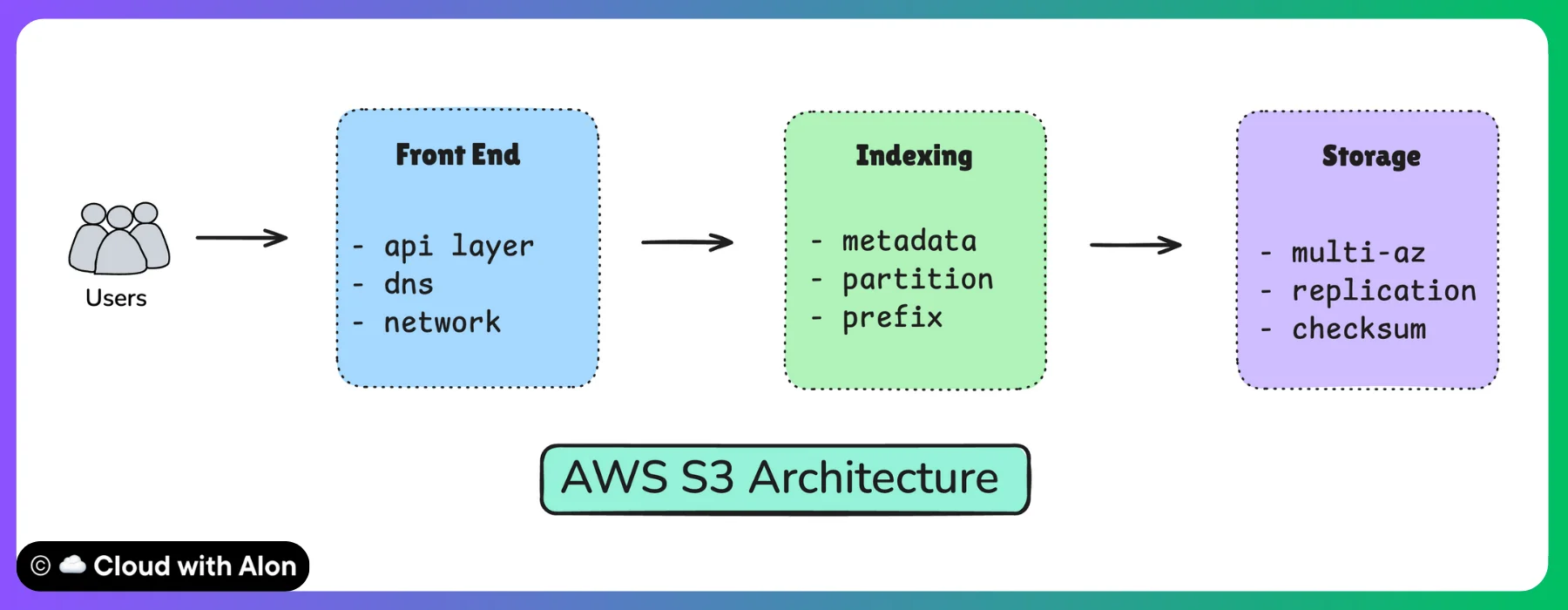
Disclaimer: In this post, I’ve shared what I’ve learned about AWS S3 Architecture in simple terms. Please note, AWS has not fully disclosed its architecture publicly. While I’ve made every effort to ensure accuracy, the information may not be entirely precise.
S3 has over 350 microservices deployed in each region, making it a highly complex system. For AWS engineers, building this ecosystem was not easy.
It has been a journey of learning from failures and continuously improving from 2006 until today.
In the early days AWS operated in a reactive mode where issues were fixed only after customers experienced them.
But as usage grew from gigabytes to exabytes this approach was no longer sustainable.
This led to a cultural shift toward threat modeling which means anticipating what could go wrong and building safeguards before problems ever occur.
With this foundation in place, the diagram above shows a simple architecture of S3, highlighting its key components and how they work together.
Frontend Layer (Entry Point)
When you upload or download a file from S3, the very first component you interact with is the frontend layer.
This layer is responsible for authenticating incoming requests, balancing traffic, and routing them to the right backend systems.
Think of this as the entry gate where every request checks in.
At a high level, the frontend is made of three pieces:
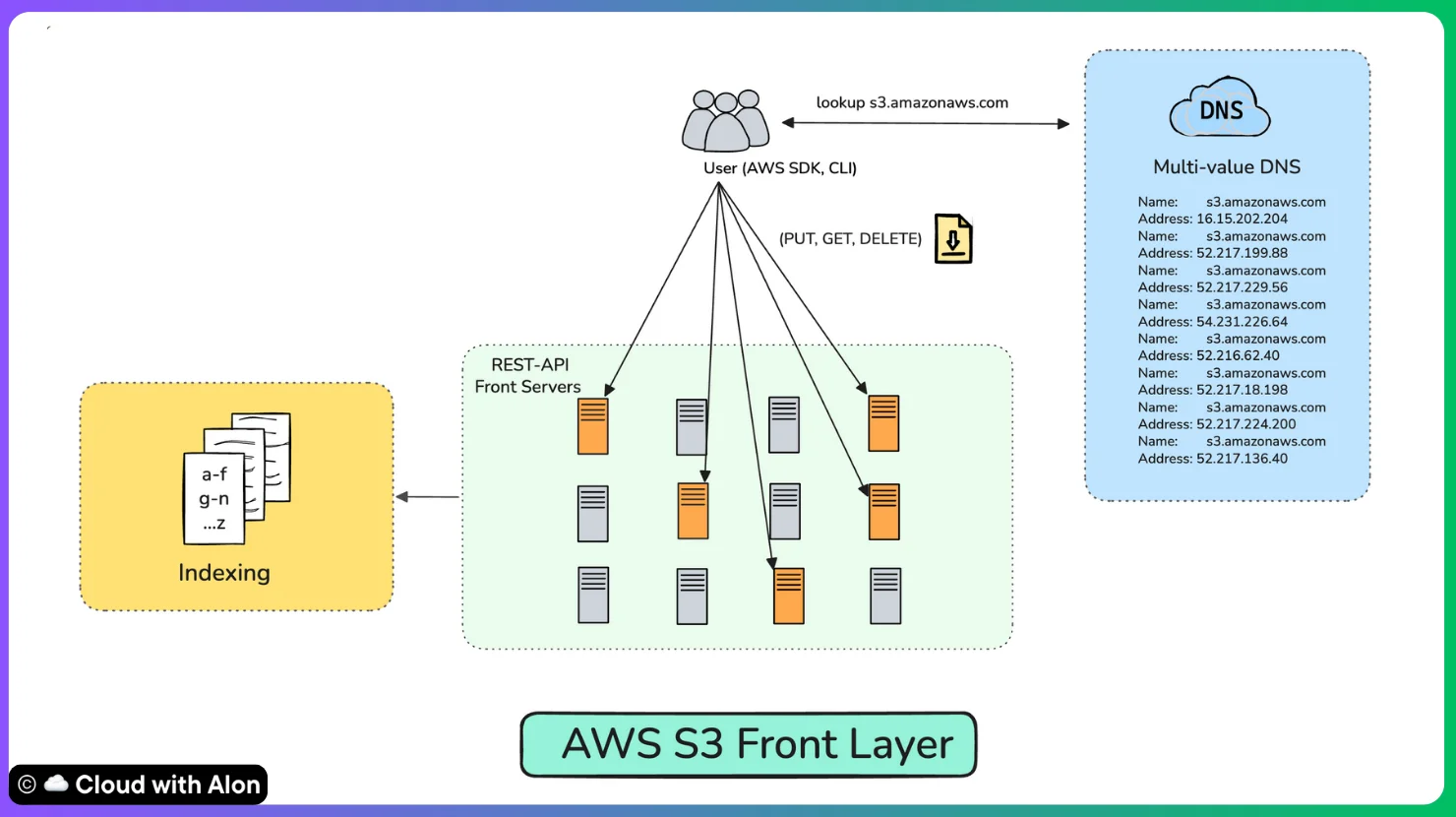
Multi-value DNS
When you type in s3.amazonaws.com, DNS doesn’t just hand you one IP address. Instead, it gives back several IPs, each pointing to a different S3 frontend server.
Your client (AWS SDK, CLI) can pick from these addresses, which automatically spreads requests across multiple servers.
This way, no single machine becomes a bottleneck and traffic stays balanced.
REST API Servers
These are the machines that actually speak the S3 API language handling your PUT, GET, LIST, and DELETE calls.
Each server has limited resources (CPU, memory, bandwidth), so AWS encourages clients to use parallelism like multipart upload and range GETs.
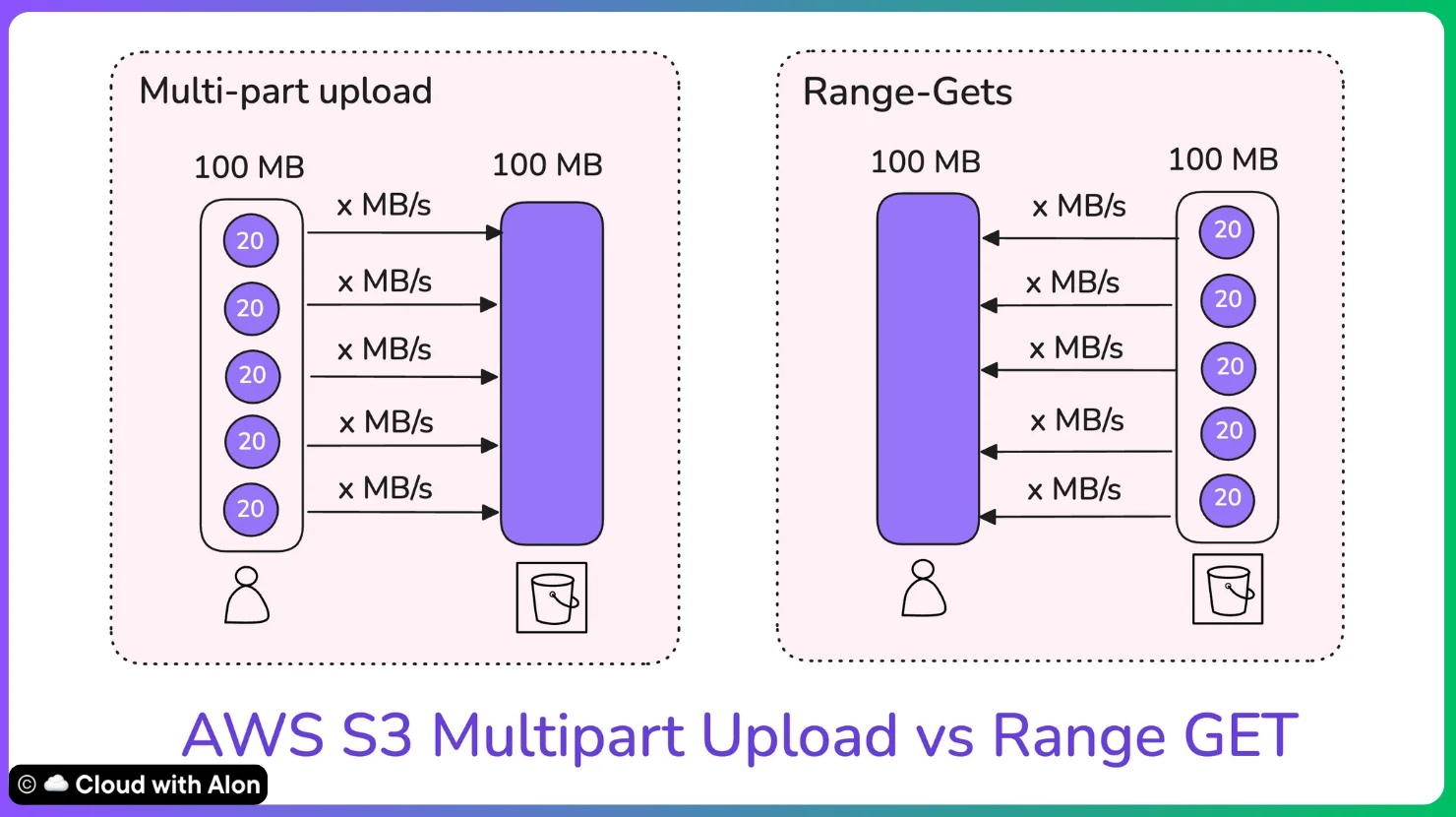
For example, if you’re uploading a huge file(above 100MB), you can split it into parts and send them to different servers at once. If one part fails, you just retry that chunk instead of starting all over again.
Routing to Backend
Once the request is validated at the front-end, it is forwarded deeper into S3 (the index and storage layers).
This separation allows the frontend to focus purely on API performance and traffic scaling, while the backend ensures durability and persistence of objects.
Of course, no system is perfect. Here’s what can go wrong and how AWS prevents it.
Threats and Mitigations in Frontend Layer
-
Threat: A single server becomes overloaded or fails
Mitigation: Multi-value DNS spreads requests across multiple servers -
Threat: Network errors may cause large uploads to fail midway
Mitigation: Multipart uploads retry only the failed parts instead of restarting the whole upload -
Threat: Limited throughput on one server
Mitigation: Parallel requests and range GETs distribute load across servers
All these capabilities are built into an open-source library created and maintained by AWS, called the Common Runtime.
It includes features such as multipart uploads, range GETs, multi-value DNS, strong checksums, and advanced retry algorithms.
Moreover, it is bundled with the AWS SDKs and CLI, allowing developers to automatically benefit from these best practices without additional effort.
Index Layer
Here’s where things get interesting.
If the frontend is the entry point of S3, then the index layer is its brain.
This layer plays a crucial role in S3’s performance, and most of the important work is done here.
It knows where every single object in your bucket lives, no matter how many trillions of objects there are.
When you upload a file, S3 doesn’t just throw it blindly into storage.
First, it updates the index with metadata: the object’s name, size, version, permissions, and most importantly where the actual data is stored.
Later, when you try to download that file, S3 looks it up in the index first, figures out which storage node holds it, and retrieves it for you.
Think of the index like a massive, distributed catalog. Instead of keeping one giant database (which would be a single point of failure), AWS spreads the index across many systems in multiple availability zones.
This gives two benefits:
-
Durability → even if an entire server or zone fails, the metadata isn’t lost.
-
Performance → lookups stay fast, even when you’re dealing with hundreds of trillions of objects.
How it works?
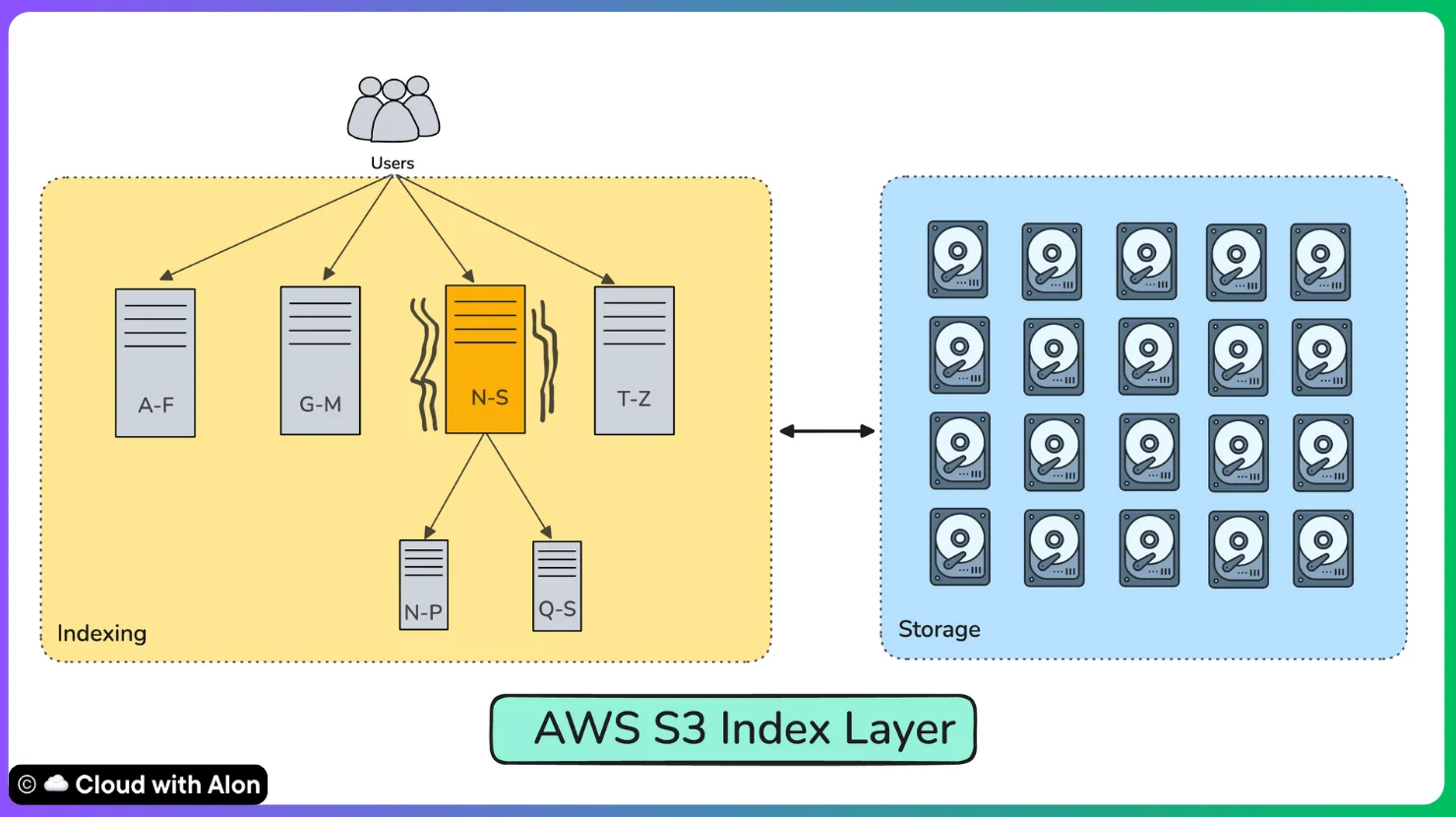
No single server can handle index of trillions of objects, so S3 partitions and distributes its index.
-
Partitioning follows a lexicographical order: objects with certain prefixes go to specific partitions.
-
Bucket object keys are hashed, especially the prefix part, to determine which partition stores them.
-
System continuously monitors partition load and can migrate hot keys to less loaded partitions.
-
When a partition is overloaded (e.g., popular prefixes), S3 splits it into smaller sub-partitions and redistributes the load.
Threats and mitigation for Indexing & Partitioning
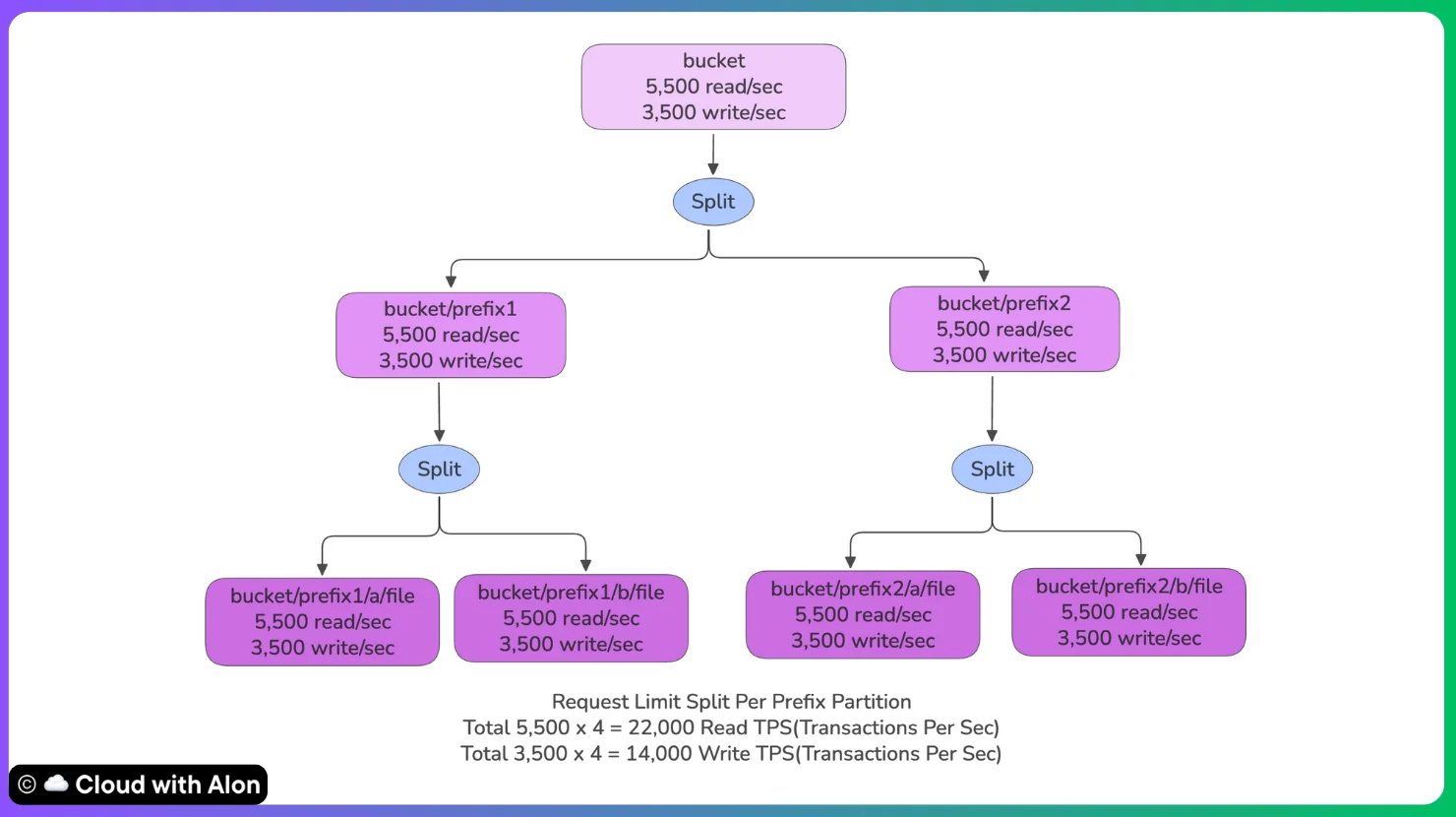
Threat: If many objects share similar prefixes, requests pile up in one partition and create hotspots. This can make performance slower or unpredictable.
Mitigations: S3 avoids this giving each prefix its own throughput capacity. User can help by designing keys smartly. This way, requests are evenly balanced across partitions and scale linearly.
Storage Layer - Where Your Data Lives
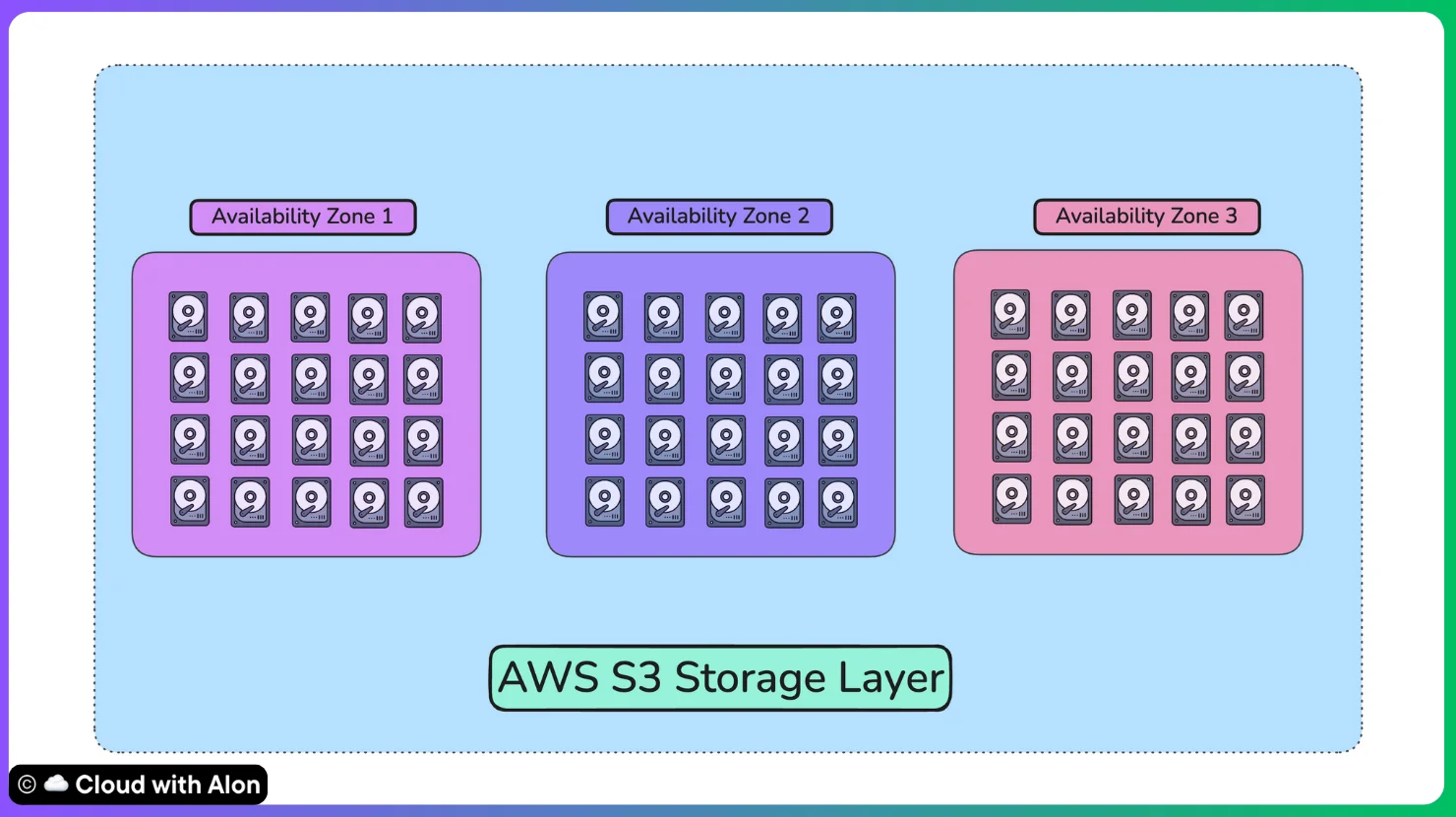
You can think of the storage layer as the heart of S3.
This is where your objects actually live, spread across millions of drives and storing exabytes of data.
When you upload a file
-
The file is broken into smaller chunks, also called shards.
-
These chunks are distributed across multiple drives.
-
The data is then replicated across at least three Availability Zones, unless you have chosen a One-Zone storage class.
The locations of these chunks are tracked in the index layer we discussed earlier, so S3 always knows exactly where each piece of your object lives.
SSDs and HDDs in S3
It is believed that S3 uses a mix of SSDs and HDDs.
SSDs are used for hot paths such as metadata, indexes, and small objects that require fast IOPS performance. They are also commonly used in storage classes like Standard and Infrequent Access.
HDDs are used for the bulk of object data since they offer large capacity at a lower cost. They are the foundation for colder storage classes such as Glacier.
While HDDs provide lower performance(IOPS), S3 overcomes this by using massive parallelism.
Data is spread across millions of drives, allowing the combined throughput of many HDDs to deliver high performance at scale while keeping costs efficient.
But here’s the real challenge.
Storing data at this scale comes with risks.
-
Drives → hard drives can fail or silently corrupt bits.
-
Zones/Buildings → entire facilities can be taken down by fire, water, or power failures.
-
People/Operations → bugs, misconfigurations, and operator mistakes happen.
Yet despite these risks, S3 still promises 11 nines of durability (99.999999999%).
Reasons Behind S3 11 9s Durability
End-to-End Checksums
First, let’s understand how S3 ensures that an uploaded file is safely stored without corruption or unexpected changes.
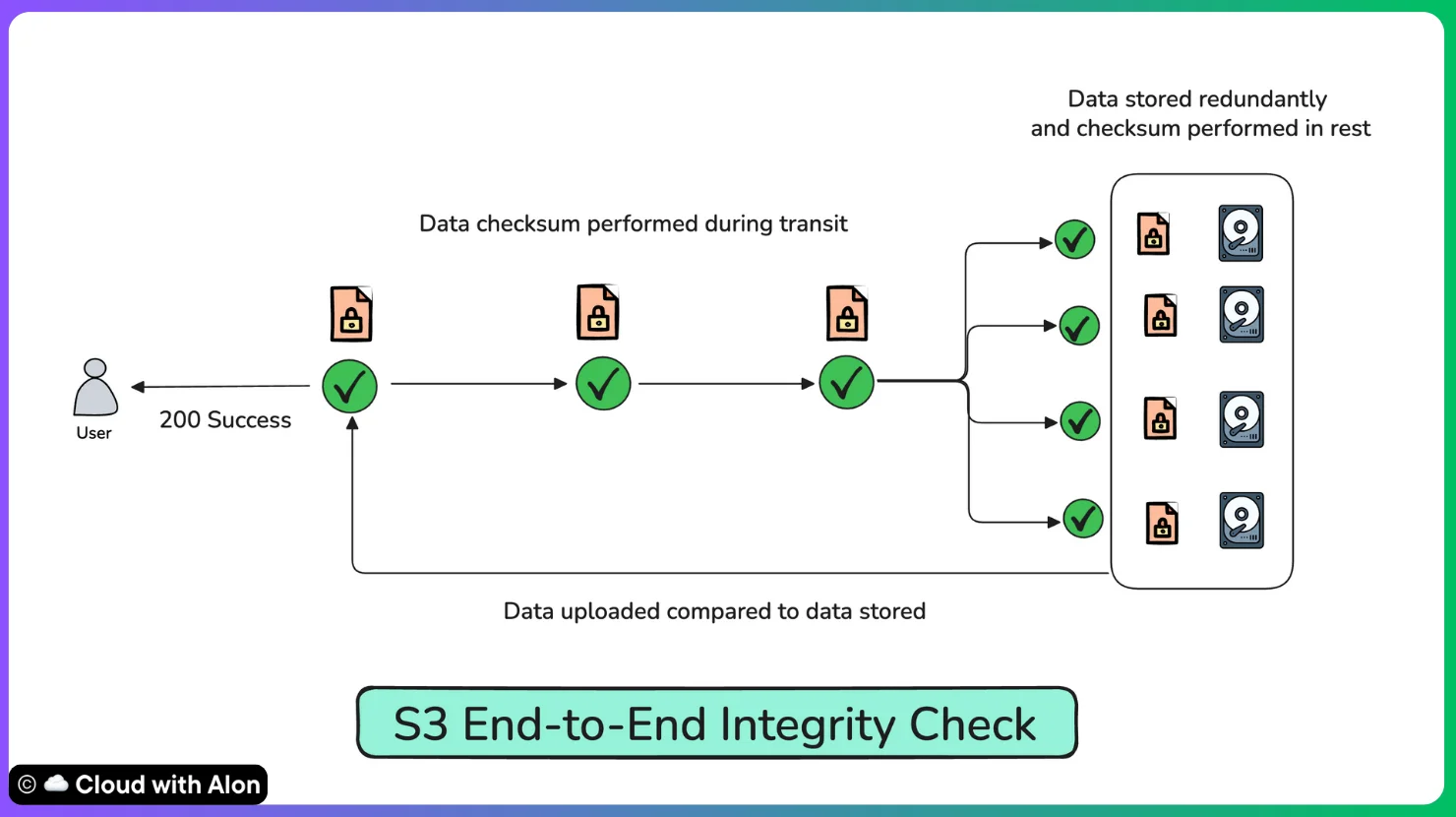
When you upload a file to S3, it immediately creates a checksum to make sure the data is not changed while moving through the network.
Once the file reaches storage, S3 calculates another checksum and compares it with the original to confirm nothing was lost or altered.
S3 uses algorithms like MD5, CRC32, or SHA-256 for these checks. Even later, when you read the file, S3 recalculates the checksum to detect silent issues such as bit rot.
This way, S3 guarantees that the file you upload is exactly the file you download. Only after all integrity checks pass S3 return a success message.
Erasure Coding
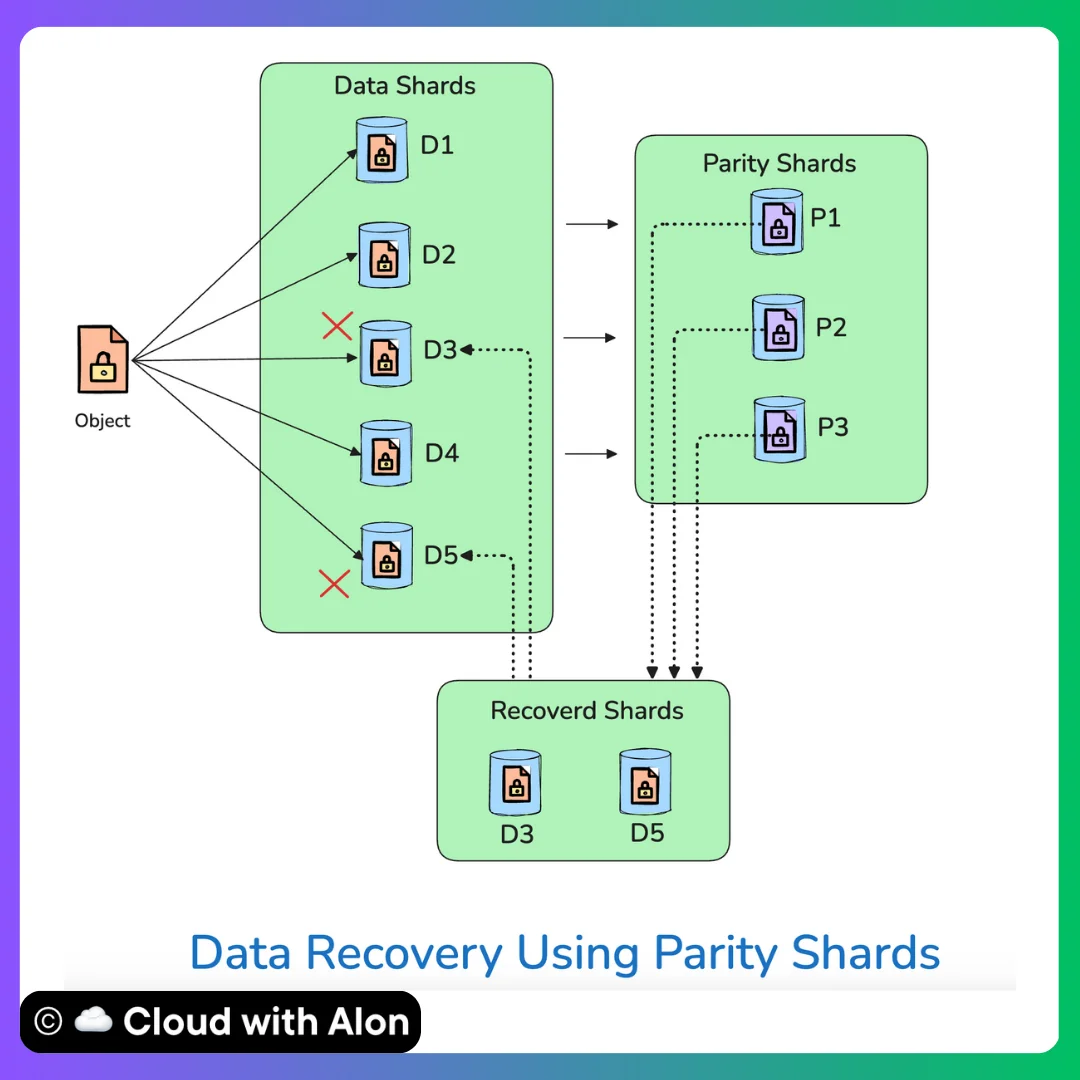
AWS uses erasure coding to save storage space while maintaining high durability.
Instead of storing multiple full copies of a file, S3 splits the file into smaller data shards and adds redundant parity shards.
Parity shards are mathematical representations of data shards that can be used to reconstruct any missing data shards.
For example, a file might be split into 5 data shards + 3 parity shards and spread across different drives. If one or two drives fail, S3 can reconstruct the missing shards from the remaining ones.
The data and parity shards are distributed across multiple Availability Zones rather than fully replicated.
This approach is primarily used for cold storage and large files, where storage efficiency and cost savings are critical.
Monitoring and Replication
S3 stores data across millions of hard drives. These drives are distributed across different availability zones (AZs) within a region.
The split shards are either replicated or distributed across these drives, depending on the requirements.
When you upload a file, the upload isn’t considered complete until all shards are safely written across multiple zones. Only then does S3 return a success message.
This guarantees reads always return the most recent data which enables strong consistency.
This wasn't always the case. Before December 2020, S3 had eventual consistency, meaning you could upload a file and immediately get a 404 if you tried to read it. It took AWS 14 years to achieve strong consistency without sacrificing performance, and they did it at no extra cost.
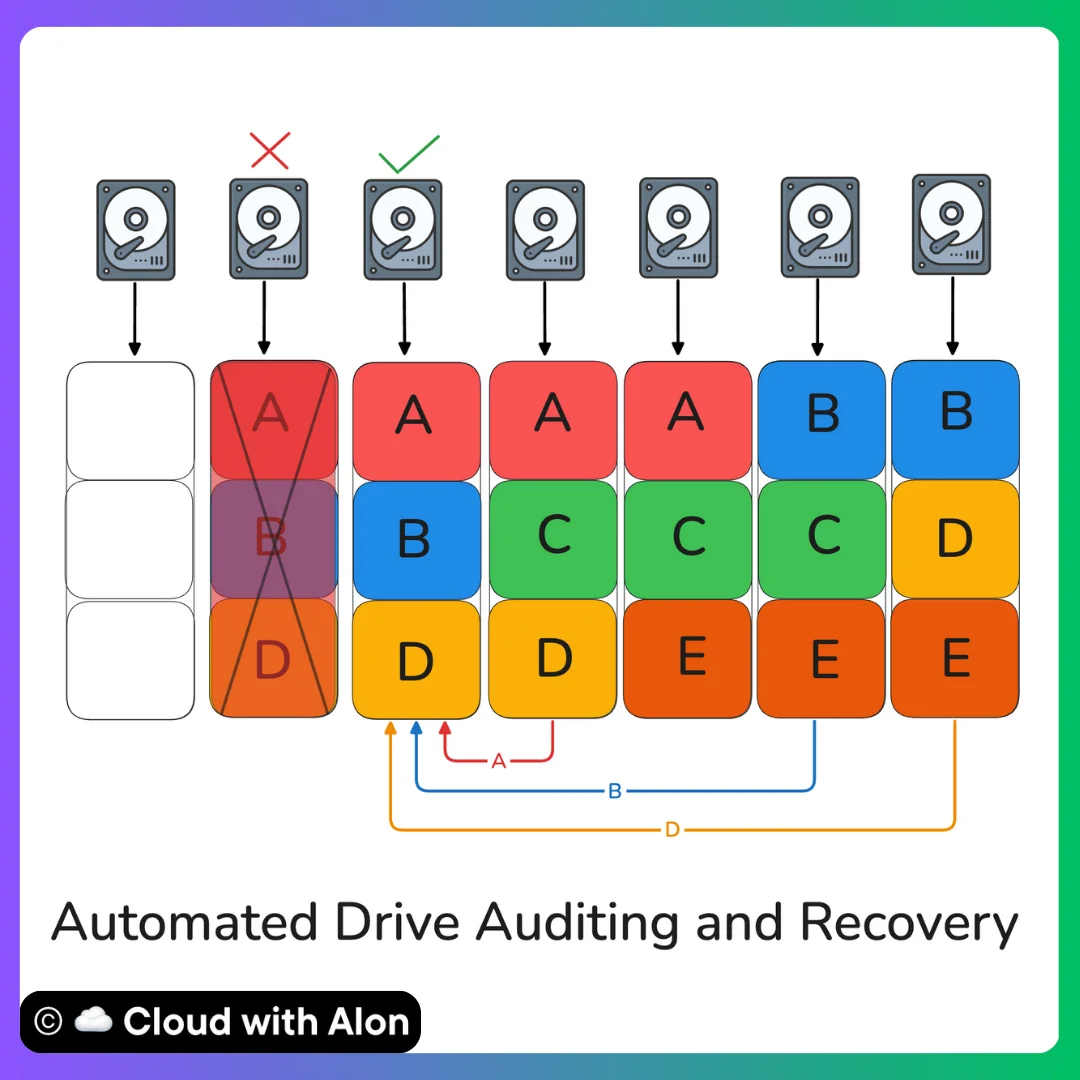
One hard truth is that replicating data across zones alone isn’t enough to keep data safe.
Drives can silently fail over time, so S3 constantly runs background audits and monitoring. It even uses machine learning to predict drive failures and fix issues before they cause any data loss.
-
Failed or unhealthy drives are detected within seconds.
-
Data is automatically re-replicated to healthy drives, often before users even notice.
-
Extra “slack capacity” is always kept available so recovery can happen in parallel across thousands of drives.
-
Silent errors, like bit flips, are caught with checksums and corrected immediately.
Availability Design
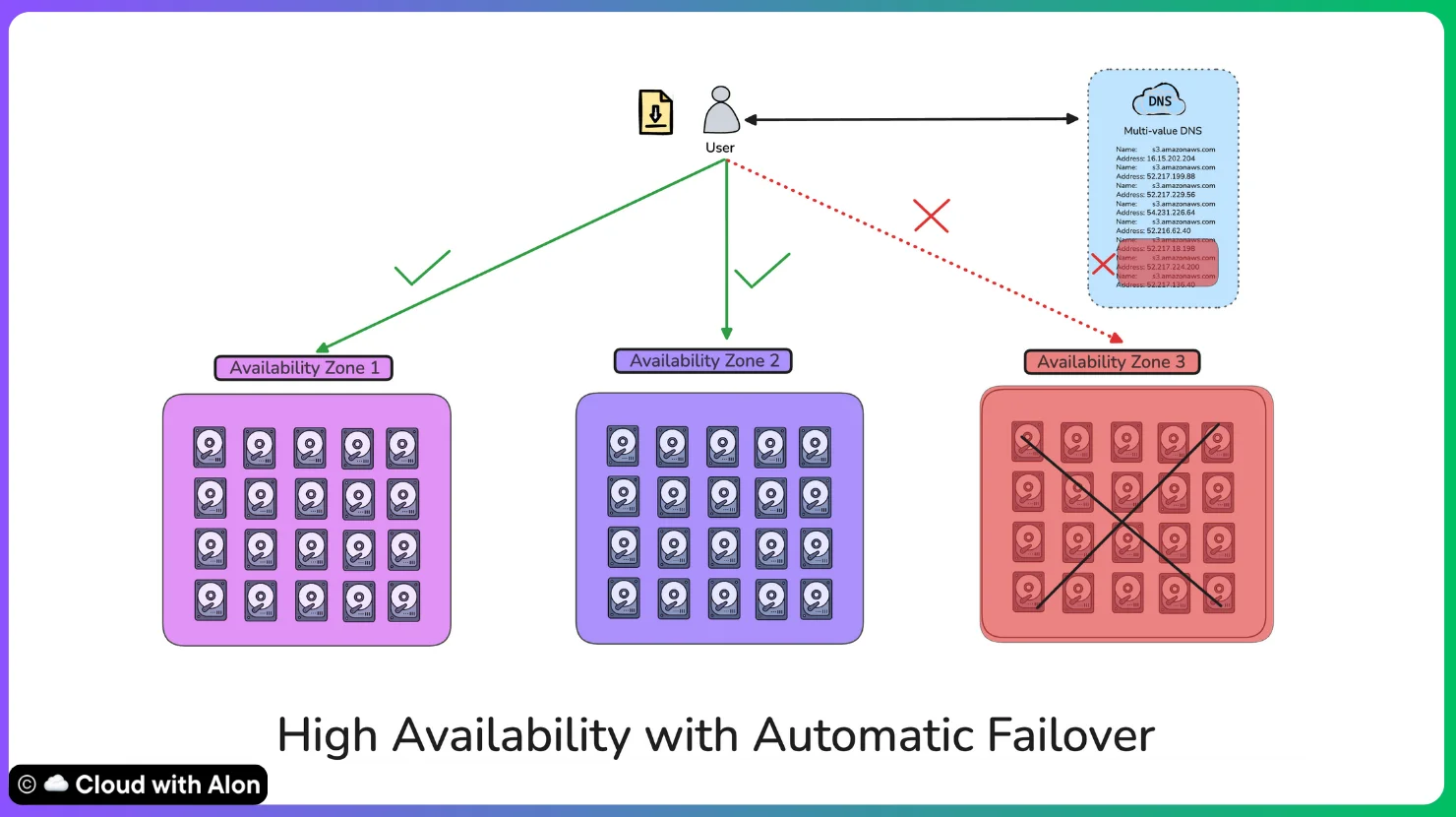
S3 is regional, not global. (don’t get confused)
Because of this, S3 helps keep latency low and reliability high.
Within each region:
-
Data is spread across multiple AZs.
-
If one AZ fails, traffic is automatically routed to healthy ones.
-
DNS ensures your application only connects to healthy servers.
-
Updates and changes are deployed zone by zone, so one mistake never affects the whole region.
This design is what enables S3 to deliver both high durability and high availability.
Mitigating Human Errors
Hardware isn’t the only risk.
Sometimes the biggest threat is us, the humans.
Human mistakes and software bugs are also significant threats to data risk.
AWS S3 offers several features designed to protect against such errors.
-
Versioning ensures that previous versions of objects are retained, allowing for recovery in case of accidental deletions or overwrites.
-
Lifecycle Policies help manage older object versions and facilitate transitions to more cost-effective storage solutions.
-
To enhance data protection, Cross-Region Replication allows for automatic copies of data in different regions, providing an extra layer of insurance.
-
Additionally, Object Lock prevents modification or deletion of objects, ensuring compliance and preserving the integrity of important data.
Lessons from S3’s Evolution
S3's architecture didn't emerge overnight.
Looking back, here are the principles that guided S3’s growth.
-
Start Simple, Scale Slowly: S3 began with basic features and added more as needed.
-
Accept Failures: Instead of avoiding all failures, S3 is built to handle them gracefully.
-
Measure Everything: Constant monitoring helps improve the system continuously.
-
Automate Recovery: Fixing problems should mostly happen without human help.
-
Limit Damage: Design to keep failures small.
Takeaway
S3's architecture demonstrates how to build systems that are simultaneously simple to use and incredibly robust under the hood.
Understanding this architecture helps us appreciate not just how S3 works, but how to think about building distributed systems that need to operate reliably at massive scale.
Next time you upload a file to S3, remember: behind that simple action is a complex, well-designed system working hard to keep your data safe, available, and fast.
If you enjoyed this breakdown, feel free to connect with me through my Linktree 🌳, where you’ll find all my social links.
Thanks for reading.
– Alon