How I Automated Cross-Account AWS Access Using STS AssumeRole
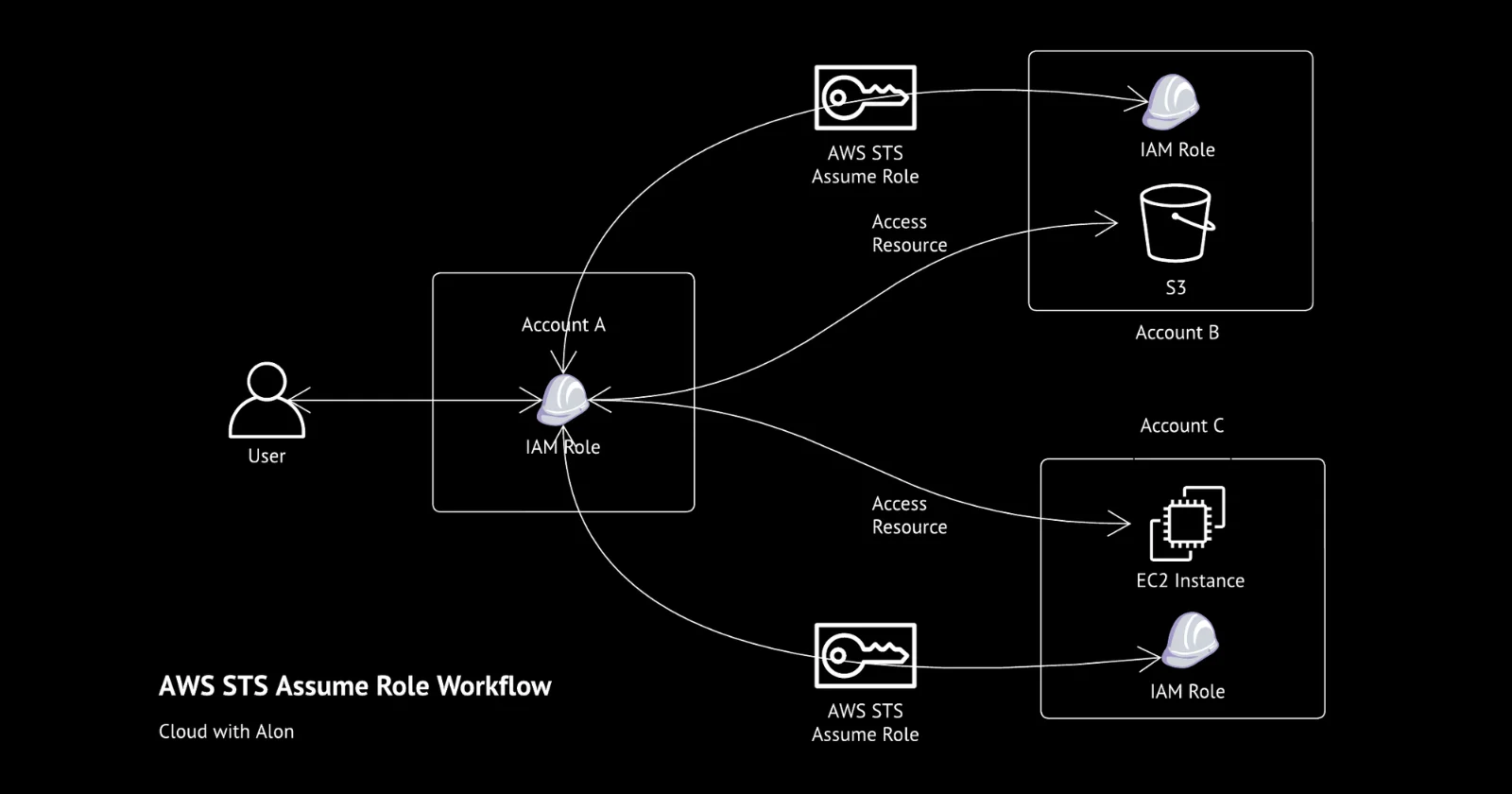
Managing multiple AWS accounts within the same organization is common today. In my experience, I have worked in an organization that manages 26 AWS accounts simultaneously.
While AWS Control Tower centralizes management, managing cross-account access for automations located in the central account to other accounts can be challenging.
Also, running the same automation in each account isn't an option either.
After testing several methods, I found that using AWS STS (Security Token Service) to assume roles for cross-account access was the most secure and scalable solution. It also reduced costs and operational overhead.
In this post, I’ll explain how I used AWS STS to run automation from the central account and access resources in other accounts.
AWS Security Token Service Assume Role
AWS STS AssumeRole provides temporary security credentials (access key, secret key, and security token) to access AWS resources in the same account or across other accounts.
In simple terms, STS allows you to assume a role and gain the permissions associated with that role for a temporary period.
So how you do it?
Creating Role in Target Account
-
Create a Role in the Target Account: In the account you want to access, create a new IAM role and give it the permissions needed for the resources in that account.
-
Update Policy in the Source Account: In the account that will be accessing the target account, update the IAM user's or role's policy to allow it to assume the role you just created in target account.
-
Add Trust Relationship in the Target Account: In the target account, edit the trust policy of the role and add the IAM user or role (ARN) from the source account. This allows the source account to assume the role.
-
Source Account Role Policy:
json { Effect: Allow, Action: [ sts:AssumeRole ], Resource: [ arn:aws:iam::DESTINATION-ACCOUNT-ID:role/DESTINATION-ROLENAME ] } -
Destination Account Role Trust Policy:
json
    {
    Effect: Allow,
    Principal: {
      AWS: arn:aws:iam::SOURCE-ACCOUNT-ID:user/SOURCE-USERNAME
    },
    Action: sts:AssumeRole
  }
You can reference this from the AWS document.
Best Way to Manage Role for Cross-Account Access
I created a role named rol_sts_cross_account in all AWS accounts within the organization using a CloudFormation StackSet. This ensures that the role name, permissions, and trust policy are consistent across all accounts.
Next, I created a configuration that can be used by all automation jobs requiring cross-account access, simply by passing the account ID as a parameter.
The function like one below that accepts the account ID, service type, session type, and region which returns a temporary session for accessing the specified service.
def getSession(accountId, service, sessionType, region='us-east-1'):
    session =
    iamRoleArn = f'arn:aws:iam::{accountId}:role/rol_sts_cross_account'
    sts_response = sts_client.assume_role(
        RoleArn=iamRoleArn,
        RoleSessionName='aws-sts-boto3-cross-account-access',
    )

    if sessionType == client:
        session = boto3.client(
            service,
            aws_access_key_id=sts_response['Credentials']['AccessKeyId'],
            aws_secret_access_key=sts_response['Credentials']['SecretAccessKey'],
            aws_session_token=sts_response['Credentials']['SessionToken'],
            region_name=region,
            config=retryConfig
        )

    elif sessionType == resource:
        session = boto3.resource(
            service,
            aws_access_key_id=sts_response['Credentials']['AccessKeyId'],
            aws_secret_access_key=sts_response['Credentials']['SecretAccessKey'],
            aws_session_token=sts_response['Credentials']['SessionToken'],
            region_name=region,
            config=retryConfig
        )

    return session
With this setup, you will receive temporary credentials and be able to access the services. However, ensure that the assumed role has the necessary permissions for those services.
You can find more informations about the source code in this repository.
Thanks for reading,
-Alon